Side Cart & Order Bumps for WooCommerce
The free, open-source WooCommerce cart drawer plugin. A lightweight slide-in AJAX side cart with a free shipping progress bar, in-drawer coupon codes, in-cart cross-sells and a one-click order bump on the native checkout — a free alternative to FunnelKit Cart and CartFlows ($99–$299/yr) that increases average order value without touching your theme.
Download the latest release · Report an issue
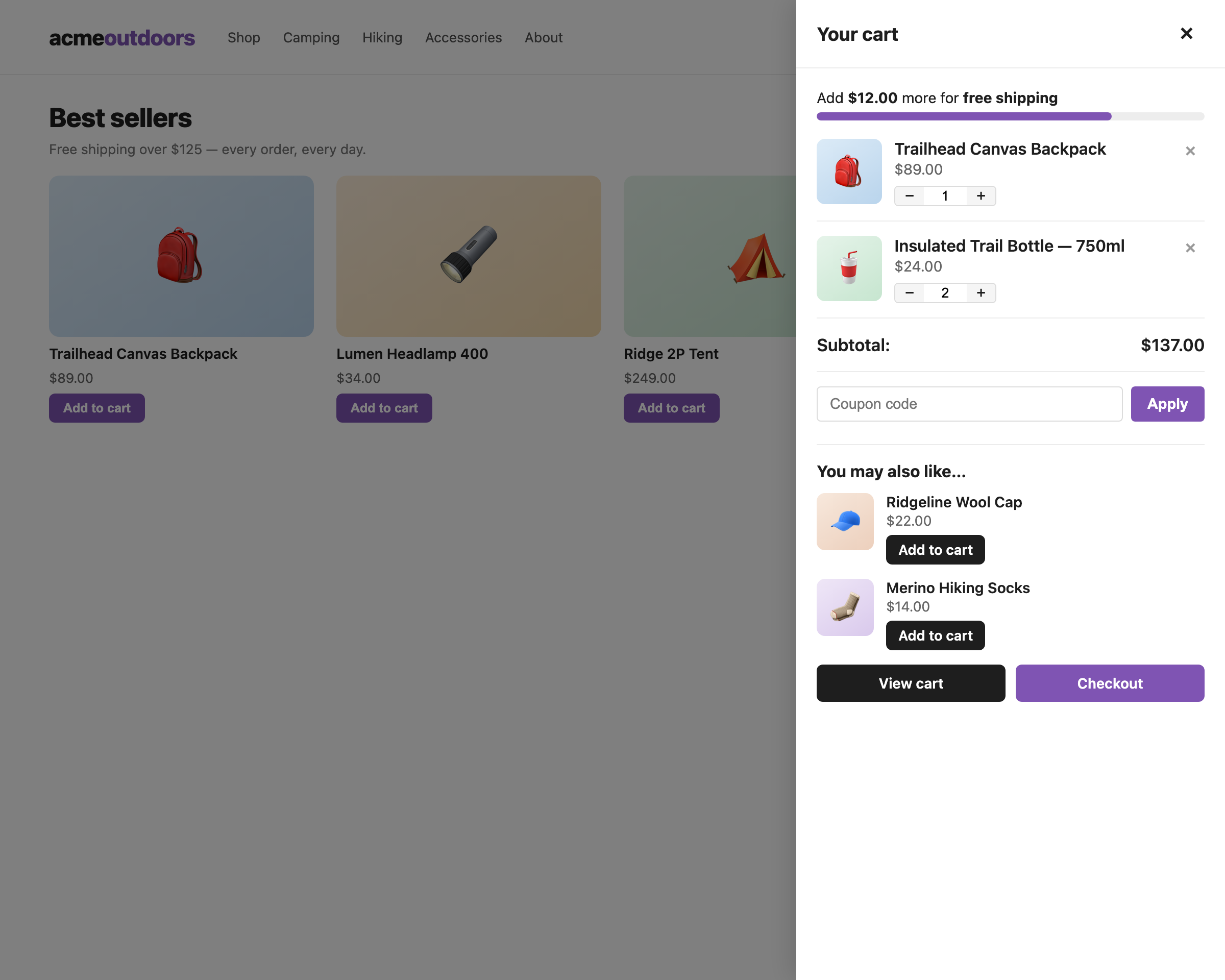
Features at a glance
| Feature | What it does |
|---|---|
| 🛒 Slide-in side cart drawer | AJAX mini cart that opens on add-to-cart and syncs through WooCommerce’s own fragment system. Floating button with live item count. |
| 🚚 Free shipping progress bar | “Add $12 more for free shipping” nudge with animated bar and success state. Threshold auto-detected or overridden. |
| 🏷 In-drawer coupons | Apply and remove coupon codes inside the drawer; WooCommerce core validates limits, expiry and restrictions. |
| 🔗 In-cart cross-sells | Cross-sell products with AJAX add-to-cart, shown right in the drawer. |
| ✅ Order bump | One discounted offer above the place-order button; toggles the real cart session so totals, taxes and shipping recalculate natively. Percentage or fixed-amount discounts with a “Save X%” badge. |
| 📊 Bump analytics | Offers accepted, orders with bump, bump revenue, checkout conversion — stored privately in your own database. |
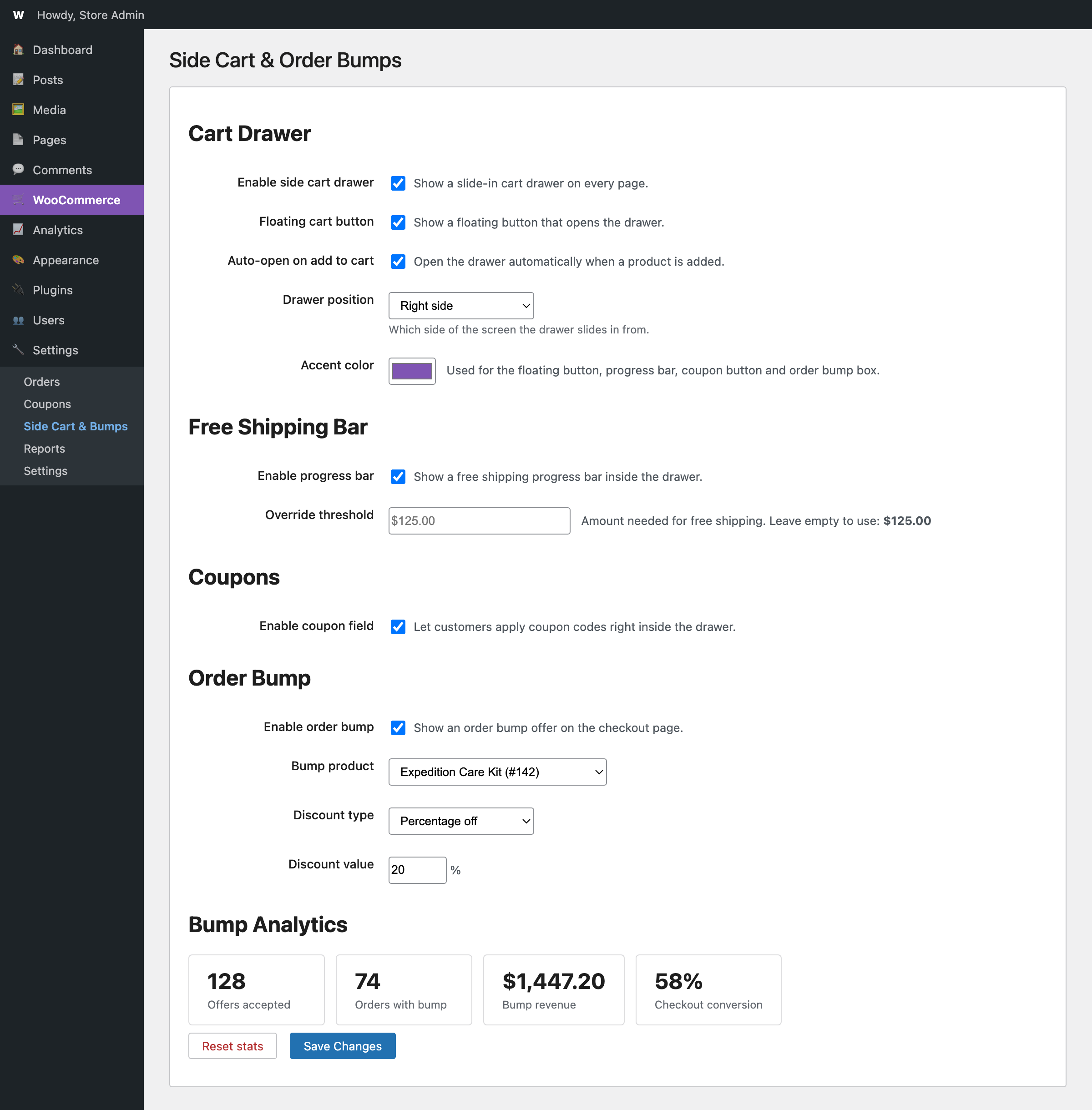
| 🎨 Customization | Left/right drawer position and an accent color picker for the whole cart UI. |
Getting started
Installation
- Download the latest release or clone this repository.
- Zip the folder and upload via Plugins → Add New → Upload (or copy to
wp-content/plugins/). - Activate, then open WooCommerce → Side Cart & Bumps.
Requirements: WordPress 6.0+, WooCommerce 7.0+, PHP 7.4+. HPOS (high-performance order storage) is fully supported.
The cart drawer
- Auto-open on add to cart shows the drawer the moment a product is added — the single biggest driver of cart-based conversion. Disable it on the checkout page (default) so it never interrupts payment.
- Floating cart button gives shoppers a permanent entry point with a live item-count badge; it’s hidden on the cart and checkout pages by default.
- Quantity steppers and remove buttons talk to WooCommerce’s native AJAX (
wc-ajax) with nonce protection, then merge the official cart fragments — so the drawer, cart page and any theme mini-cart widget stay in sync. - Position — slide the drawer in from the right (default) or left under Cart Drawer → Drawer position.
- Accent color — one color picker re-colors the floating button, progress bar, coupon button and order bump box.
- On screens under 480px the drawer becomes a full-width sheet.
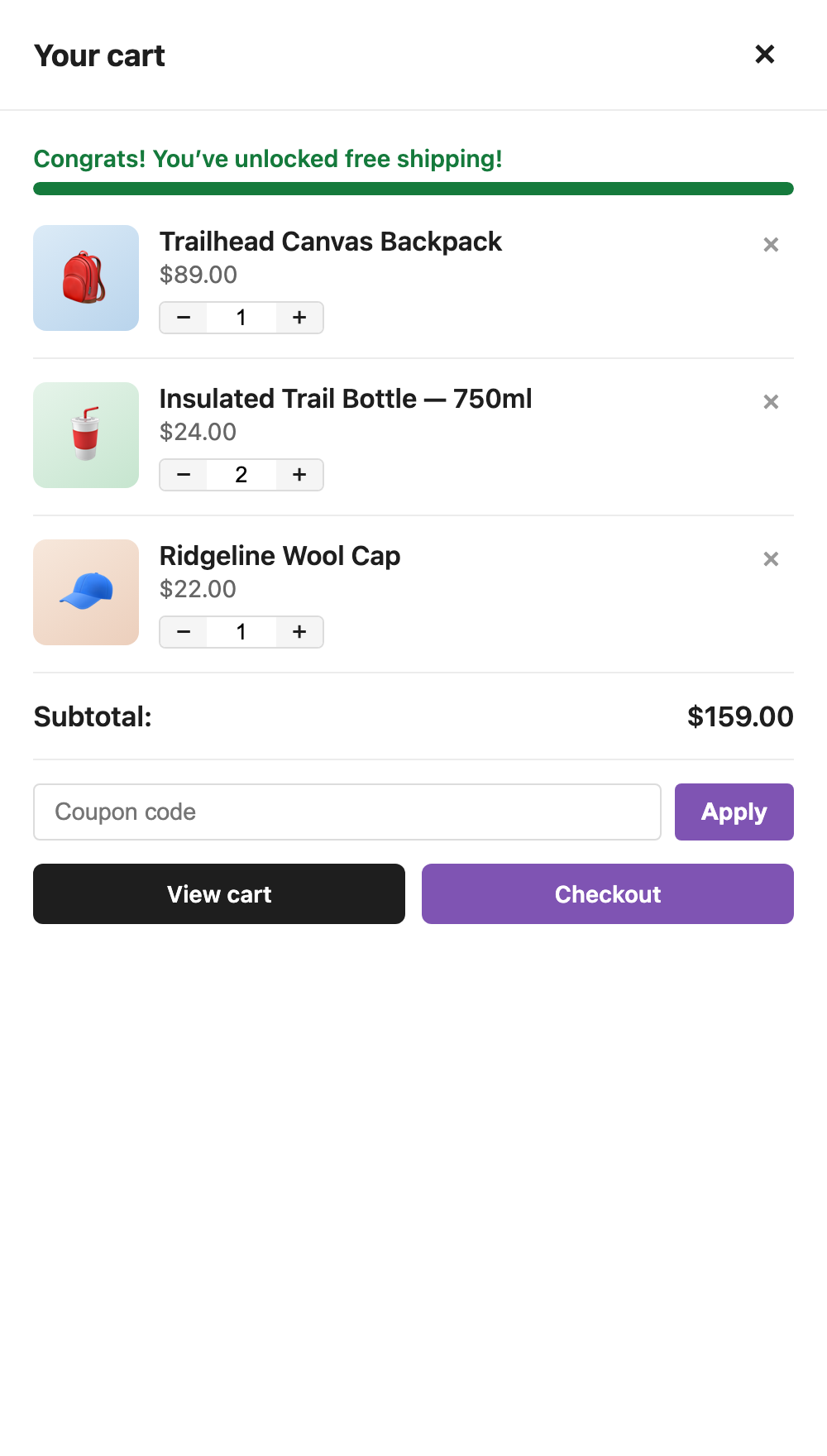
Free shipping progress bar
The bar appears inside the drawer and updates with every cart change:
- The threshold is auto-detected from your Free Shipping methods (
min_amount) across all shipping zones — including “Everywhere else” — with a fallback to the legacy global setting. - Coupon-only free shipping (no spend threshold) is ignored, so the bar never promises something your store won’t deliver.
- Set a manual amount under Free Shipping Bar → Override threshold (useful for multi-currency stores), or filter it in code:
add_filter( 'wscb_free_shipping_threshold', function ( $threshold ) {
    return 150.0; // always show a $150 goal
} );
Coupons in the drawer
Shoppers who leave checkout to hunt for coupon codes rarely come back. With the coupon field enabled, they can try codes immediately — WooCommerce core handles validation, usage limits, expiry and restrictions, and messages render as drawer-local notices:
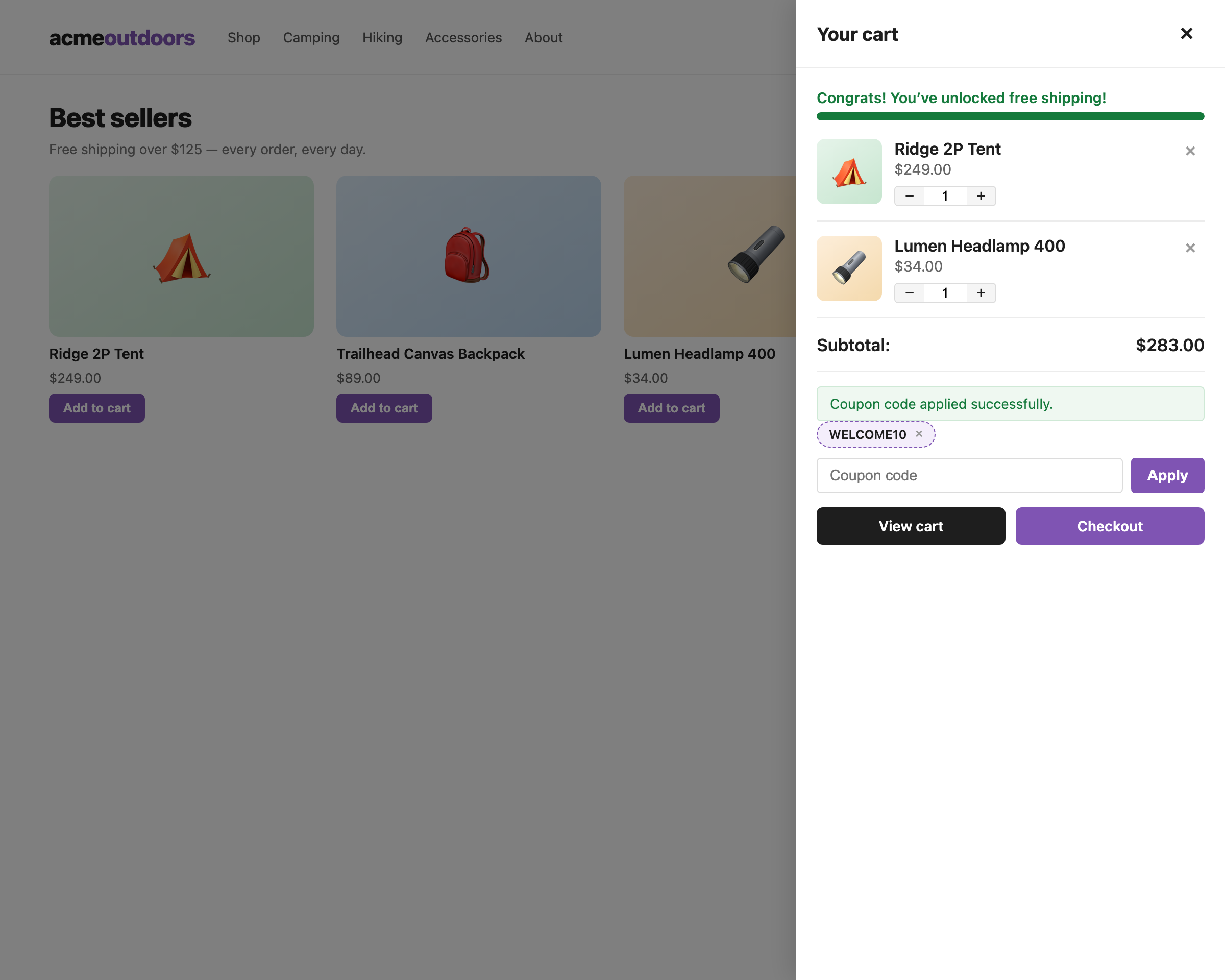
Applied coupons appear as chips with a one-click remove (×).
In-cart cross-sells
Assign cross-sells to a product (Product → Product data → Linked Products) and they appear inside the drawer with AJAX add-to-cart buttons for simple products. Only visible, in-stock, purchasable products are shown; hide the section entirely from settings.
The order bump
The bump renders a single checkbox above the Place order button on the classic WooCommerce checkout:
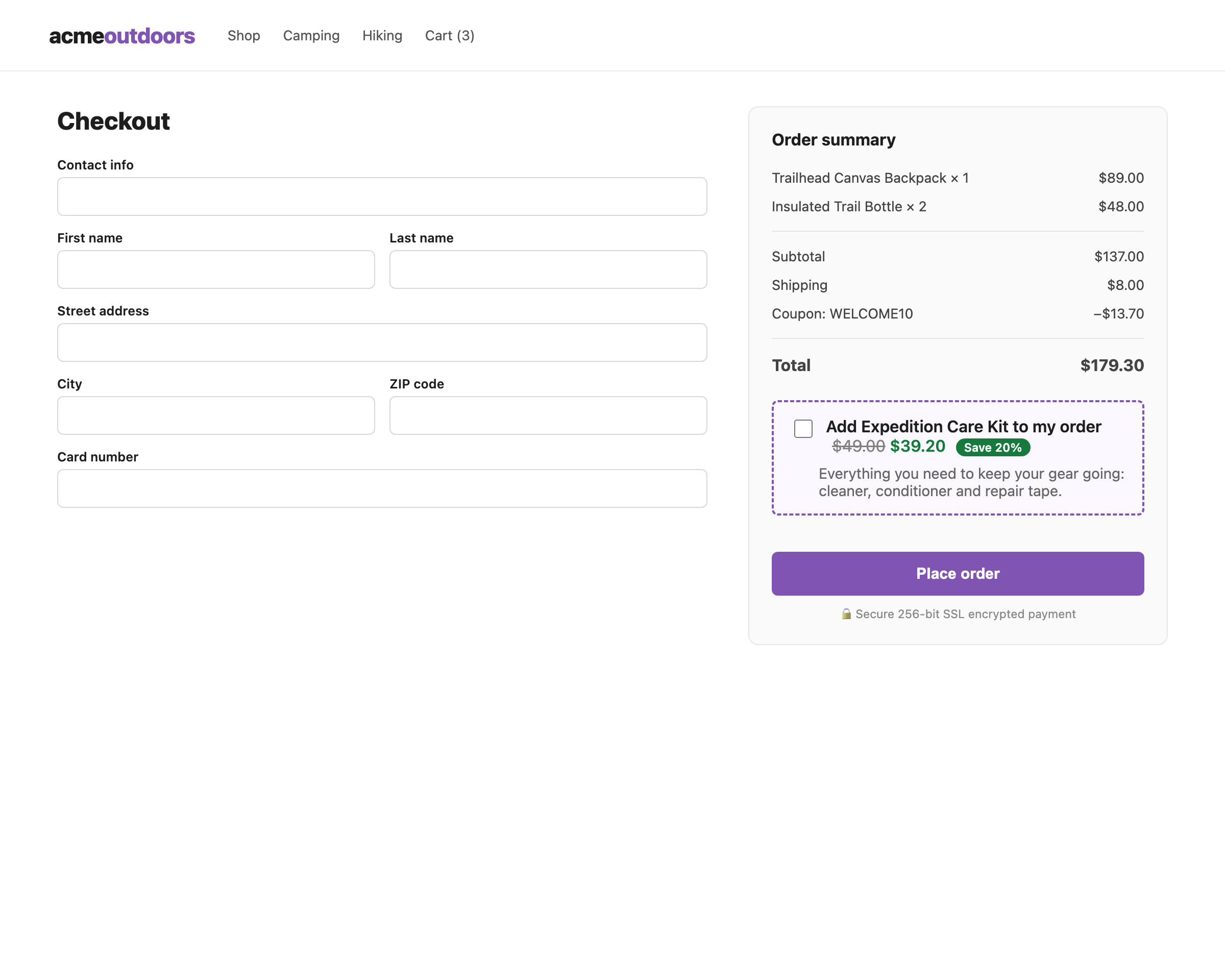
Setup under Order Bump:
- Enable order bump and pick the offer product.
- Choose a discount type — Percentage off (0–100%) or Fixed amount off — and the value.
- Optionally customize the checkbox label (
{product}placeholder supported) and description, then save.
How it works — and why it’s safe:
- Checking the box adds the product to the real WooCommerce cart session over a nonce-protected AJAX call; unchecking removes it. WooCommerce then recalculates totals, taxes, shipping and coupons through its own
update_checkoutpipeline. No parallel price math to drift out of sync. - The discount is applied to the bump line item only, during WooCommerce’s own
woocommerce_before_calculate_totalsrun. The base price is captured at add time, so recalculations never compound the discount. - Bump quantity is locked at 1 in the drawer, on the cart page and at checkout; duplicate adds are prevented server-side.
- The checkbox state always mirrors the real cart — if the item is removed elsewhere, it renders unchecked on the next load.
Note: the bump requires the classic checkout (the
[woocommerce_checkout]shortcode). The block-based checkout is not supported yet.
Bump analytics
The settings page shows four counters — offers accepted, orders with bump, bump revenue and checkout conversion — plus a reset button.
- “Offers accepted” increments when the checkbox successfully adds the bump.
- Bump line items are flagged with hidden order item meta (
_wscb_bump); an order containing one counts as a conversion, and its line totals count as revenue. - Everything lives in a single option row in your own database. No external analytics, no cookies, no personal data.
Developer API
A small, documented surface:
| Hook | Type | Description |
|---|---|---|
wscb_free_shipping_threshold |
PHP filter | Filter the progress bar threshold at runtime. |
wscb_setting |
PHP filter | Override any setting at read time. Signature: ($value, $key). |
wscb_drawer_opened / wscb_drawer_closed |
JS events on document.body |
Drawer opened/closed. |
wscb_coupon_updated |
JS event on document.body |
Fires after coupon apply/remove; first arg is the array of applied codes. |
wscb_open_drawer |
JS event on document.body |
Open the drawer programmatically. |
[data-wscb-open] |
HTML attribute | Click-to-open: add to any link or button. |
// Open the drawer from your own script.
jQuery( document.body ).on( 'wscb_drawer_closed', function () {
    console.log( 'cart drawer closed' );
} );
Custom AJAX endpoints (all wc-ajax, all nonce-protected, guests included):
wscb_update_cart_item · wscb_apply_coupon · wscb_remove_coupon · wscb_toggle_bump
Why it’s fast
No build step, no jQuery UI, no bundled libraries, no external requests. The drawer re-renders via woocommerce_add_to_cart_fragments, so it inherits WooCommerce core’s AJAX behavior instead of reimplementing it. Assets are a few kilobytes of plain CSS/JS, versioned by file modification time.
FAQ
Does it work with HPOS (high-performance order storage)? Yes — compatibility is declared explicitly on load.
Which checkout does the order bump support? The classic shortcode checkout. The WooCommerce block checkout is planned.
Can customers change bump quantities? No — bump items are locked at quantity 1 and are toggled with the checkbox, keeping analytics honest.
What happens if the customer removes the bump product elsewhere? The checkbox always mirrors the real cart and renders unchecked on the next load.
Does it create database tables? No — two options rows at most (settings and analytics counters), both removed on uninstall.
Is it translation-ready?
Yes — every string is internationalized and a .pot ships in languages/.
Can I use multiple bumps? One well-tested bump per store for now; multiple offers are on the roadmap.
Changelog
See CHANGELOG highlights in readme.txt.
- 1.1.0 — in-drawer coupons, drawer position, accent color, fixed-amount bump discounts, bump analytics dashboard, focus-trap accessibility,
wc_ajax_*endpoint fix. - 1.0.0 — initial release: slide-in drawer, floating button, auto-detected free shipping bar, cross-sells, native-checkout order bump.
License
GPL-2.0-or-later. Free software, no upsells, no tracking.